PROJECT 01
MES
Duration
Type
Role
9 months
Team project
UX
Building a drug batch processing Data Management Tool for Manufacturing Execution Systems (MES).

Designing
We validated our findings with the Product Owner (PO) to check if something was missed or understood incorrectly.
Not only did we cover the problems that they were aiming to solve, but we also ended up finding new challenges that can be resolved to create a truly great product.
Validating our research
Initial Idea was to mention all the orphaned parameters on the left. We can mention the location of the impacts of the parameter in the middle pane. Through the right pane we can easily fix all the impacts and then delete the orphaned parameter. This design would also be in line with the rest of the recipe author portal and thus would be easy to navigate We could also filter out the Orphaned data types to reduce load.
Challenges: It was very tricky to implement from the technical perspective. Having the same format and layout at two different pages would not be a best practice to follow.

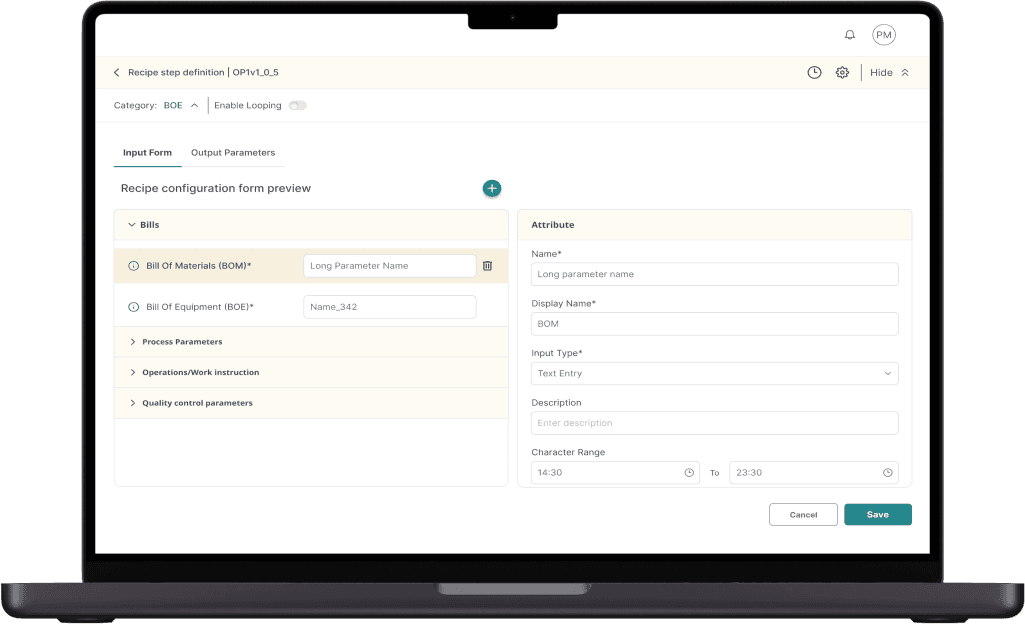
A loud floating action button as a single call to action to do anything on this page. Upon clicking we can select what kind of input field is required to be added
Audit trail and settings tucked in a discreet upper right corner, barely intrusive and only accessed for only for special requirement.
Since each element has a lot of attributes we needed a second pane to define the form effectively.
The users can edit the names (both technical and display) both on the form and on the attributes.
Users can also set default values in the form.
Collapsible categories for handling extensive forms and for other organizational purposes.
On to the top left, post-heading, the category is displayed, given its compulsory feature and single-run operation alongside looping. Following selection of a category, it could be hidden within settings to free up vertical space, but it remains accessible for potential modifications.
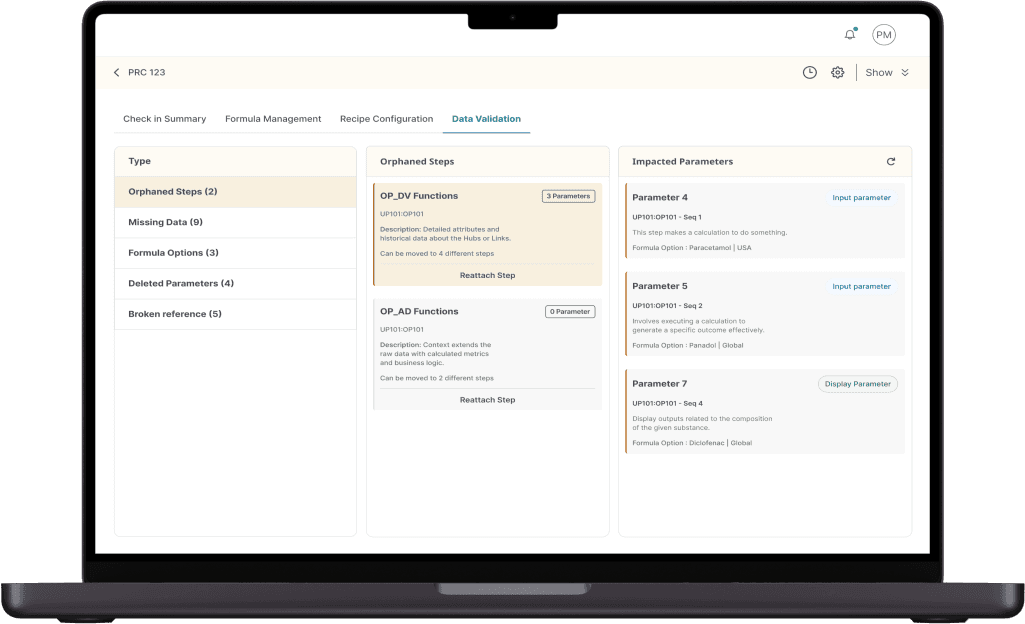


Impacts : The deleted data in the middle pane has a lot of impacts throughout the recipe (many parameters are linked to each other). Suggested to create an impacts column through which the user can trace which data are now invalid because of the deleted source.
This is immensely helpful for the users to keep a track of invalid data before they publish the recipe and getting an error
Users can click on the card to open the impacted parameter in the new tab and fix it.
The idea was to make it like a to-do list. Check off a few parameters from this list and click on the refresh button to gain the satisfaction of completing a task
The refresh button allows users to simply update the impacts, thus lowering the load time.
Avoid deleting any orphaned data until all impacts have been cleared to maintain a structured database
The impacts have a distinct step ID | Cycle (UP101OP101 | iteration 1) than the Orphaned step. Hence, we emphasized such data in the impacted parameters.
Segregated the different kinds of orphaned data to divide the load and take specific actions for the specific kind of orphaned data.

There can be numerous iterations. The user usually knows which iteration to go to, hence opted to show a list of the hidden iterations in a drop down selection.
Maintained the display's format consistent with what the site operator can see. Offers the author a glimpse of the final output.
The structure of the Syncade screen is closely mirrored. When set side by side for comparison, it simplifies interaction with these applications.
A “navigator” to ease navigation when the recipes become too big.

Screen 2
This is the primary space used for configuration of parameters.
Quick Navigation : Users can navigate within the Recipe using both the flowchart and the tree structure as per requirement.
Dynamic Layout : All three panes can be shown or hidden.
We were very sure of the screen layout since the beginning, it had to resemble the Syncade screen
Screen 3
This is the screen for managing orphaned data i.e. the data which can no longer be used but is still in the system.
Maintaining the consistency of the three panes across the recipe author portal.
Requirements for this section were not provided, just the need to maintain a clean database after certain items were deleted. This section was hence designed and was extremely well received by both the client and the users.
Design Decisions
Design Decisions
Initial idea for Data Validation screens (prev. Orphaned Data)
Final Data Validation screen
Define Refine
The requirements for the project were initially provided by the product owner. Our role involved refining those requirements and offering suggestions to enhance the product’s usability and overall quality. We set up brainstorming sessions with the PO to discuss each requirement in detail.
The Product Owner outlined the requirements, and during our discussions, we proposed subtle enhancements that elevated the user experience without increasing development costs.
The PO was always looking for our suggestions as to how a certain problem should be solved.
By the end of the project, we had developed such a deep understanding of the domain that the Product Owner entrusted us to design certain features without providing any requirements, eager to see our suggestions.
Screen 1
This is the place where the admins create the parameter form for each step.
We kept the form in the left pane as a live preview of what the author needs to fill out, ensuring the admin has a clear view of what they are creating.
The form is highly dynamic, allowing users to categorize parameters, easily rearrange them with drag-and-drop functionality, and add or delete fields effortlessly
Pain points
Inconvenient data organization.
No version history to evaluate the changes.
High chances if manual error.
Not clear as to which columns function and purpose.
Very cumbersome to import and export data between environments.
Hard to track requests.
Have to demonstrate via screenshots.
Dependency on the RA to update his changes to be migrated.
Knowing what has been changed by RA is tough to track.
Customer journey (Admin)
Paul McCarthy
Admin

Customer Lifecycle
Customer Lifecycle
Create data
Migrate data
Creating the Master Data
"There aren't sufficient columns for all the parameters"
"I want a hassle-free
master data definition and configuration tool"
Peter is the recipe configuration administrator for the master data. He creates/updates and defines the Recipe Objects. But the current application is too complex, especially when dealing with huge amount of data (for a single ask) that are stored in different places.
Referencing Data
"It's truly inconvenient when the origin of the information is unknown"
Creates and edits
master data.
Exports data in
test environment
Demonstrates
functionality
via screenshots.
Monitor changes
by RA and
migrate them
Migrates and test data
Log out
Tests system
functionality
Defines/edit RO
in RA tool
(site admin)
Figure out the
day's work
Logs in
Pain points
No linkage between RE and RA
Bad data organization
Multiple table issue
No error check.
No standard naming convention.
Poor performance
No version history/management.
Lack synchronization in making changes.
Customer journey (Recipe Author)
Shirley Sheen
Recipe author

Customer Lifecycle
Create flow
Input data
Test
Reflect
Configuring aliases
"In which group does the alias for this belong?"
Configuring data
"What do this column do?"
“If the person coordinating this could entirely concentrate on the planning, without any digital interferences, they'd do exceptionally well.”
Shirley is responsible for the creation and configuration of recipes. She has highly technical. However, with the current application it becomes difficult for her to configure recipe objects with no direct connection between RA and the resource editor.
Tracing back errors
"Where did I make the error?"
Logs in
Checks out a
unit procedure
Works on a
recipe flow
Checks in
Edits a recipe object
definition if needed
Checks in the
Resource Editor
Dry run of
the recipe
Checks in
after editing
Traces back errors
Asks for relevant
master data
if needed
Configures data in RE
Repeats process
for all recipe objects
Pain points
Manually tests each step
Version history is not available to compare values (to review the change)
Has to send a report as screenshots and not a formal report.
Dependency on the admin to put the steps in test environment.
Current toolset not intuitive.
Dependency on recipe author to create test script.
Customer journey (Recipe Validator)
Kelly Reynolds
Recipe validator

Customer Lifecycle
Get requirements
Test
Validate
Act
On any new changes
"What alterations were made?"
“It’s inconvenient to test all the changes on each step manually”
Kelly verifies the adjustments made by the Recipe Author according to the quality guidelines. With the existing software, monitoring modifications and scrutinizing them effectively becomes unachievable.
Creates test script
(needs collaborations
with RE and admin)
Logs in
Validates every step of the
requirement against the test script
Collects the outputs
as screenshots
Retests the
updated steps
Logs out
Sends the report to
the quality team as a
set of screenshot
In case of errors
notifies the admin
and RA.
Gets requirement

















Laid down the current user journeys of the different user personas and analyzed what could have been their thoughts, emotions, pain points and where can be possible touchpoints.
Even when we had the requirements in had, this exercise was essential to be done to put myself in the shoes of the user and understand them extremely clearly.
This made me realize the importance of each requirement and helped me produce better ways to tackle them.
Below is the user journey for the Admin, QA and Recipe authors. You might need to go through the trouble of zooming in to view some of the details.
UX
Leverage design principles to develop a data management tool for Manufacturing Execution Systems (MES). Our aim is to provide an efficient, intuitive platform which not only allows easy configuration/editing of recipe data but also targets everything that can help reduce the time and cost in process improvements or new product introductions.
Enterprise MES

Understanding the goal of the project and the stakeholder’s vision.
Understanding the domain and the exact problems we are trying to solve.
Empathizing with the users and creating detailed user personas and user journeys.
Responsible for the brainstorming with the product owner on the requirements and providing ideas to enhance the UX.
Designing High fidelity wireframes and prototypes to communicate the ideas and solutions clearly.
Working actively with the development team to understand the feasibility of solutions and exploring the best solutions given the time and technical constraints.
Ensure proper execution of sprint and timely delivery.
My role and responsibilities
Overview
Outdated recipe editor:
The current MES strategy and solution does not address new company critical success factors of flexibility to deploy across manufacturing technology, simplicity to address process improvements and reduced cost to implement new product introductions.
Approaches:
We designed the tool to provide a familiar UI which has a similar interface as their current recipe creation tool thus providing a seamless and intuitive experience across both the tools
Outcomes:
We have successfully developed an overall UI structure in phase 1 for Site Admin and Recipe Author, the key end-users, and to define and configure the drugs’ recipes.
Modernization:
The team was tasked to transform the old editor into a modern data management tool offering efficiency and flexibility in drug batch processing across global manufacturing facilities.
Design Process
Empathize:
Understanding and empathizing with the users, their current problems and work environment in detail through multiple
user interviews across all personas that are involved.
Define:
The problem statement and the feature list were already in place from the client’s end in this project.
We built this product requirement by requirement, so we did provide suggestions that altered the initial idea of the client and improved the overall user experience.
Design:
Once we were set with the understanding and the problem statement, we started fleshing out wireframes (and visual designs upon approval of wireframes) based on requirements and brainstorming sessions.
Test:
Once the Wireframes were ready, we would send them across to the client for user feedback.
Iterate:
The feedback from the users helped us understand the problem, question our assumptions and helped us to provide a
better solution.
Challenges
Understanding the Industry:
To be able to design an effective solution we had to first understand MES(Manufacturing Execution Systems) in detail. We needed to understand how client industry works, what kind of data do they deal with and what are the challenges they face.
Understanding current tools:
The biggest challenge was understanding the current tool in use. Although it was outdated and overly complex (which was why a new one was needed) it was crucial to comprehend its functionality in order to design a more efficient and improved solution.
Empathizing

Understanding the tool for recipe creation
User journey analysis (Process)
Each step has a data that needs to be input through input parameters.
Our tool is used in conjunction with Syncade as a tool to manage the data.
We designed our tool with a layout similar to Syncade, allowing the Recipe author to have a seamless experience when working with both tools simultaneously.
It can be noticed that in Syncade there are many parameters per step.
Our tool must manage the data for the recipes.
The current tool is a very complex tabular software to
store data .
The complex tables and folder structures are used to fill and manage data.
Each cell relates to an input parameter but it is very unintuitive to know which parameter it relates to.
This tool gave us our most important keyword – Intuitiveness. We designed our tool keeping Intuitiveness as our primary experience objective.
Paul McCarthy
Admin
Paul serves as the master data's recipe configuration overseer. He creates/updates and defines the Recipe Objects. Nevertheless, the existing software becomes overly intricate, particularly when handling substantial volumes of data (pertaining to a single task) stored in various locations.
Persona 1
Bio
Very experienced in defining recipe operations and Master Data
Highly skilled with resource editor and recipe authoring tool
Responsibilities
Defining and editing the Master Data.
Defining Recipe Objects (UP/Operations/ Work) instructions and their parameters.
Configure Recipe Objects (minor responsibility)
Goals
To define and edit master data/Recipe Objects in a hassle-free manner.
To create and document the data in versions.
To configure the formula specific data with the information on other formulas.
To avoid making human errors while creating data.
Needs
A direct link between RA and the tool to configure recipes.
A single screen to define all the Recipe objects.
Same for Master data.
Unlimited data storage in the same place.
Access to previous versions of data.
Real time verification check.
Rules for data input to avoid human error.
Bulk configuration.
Drop Down selection
Katty Page
Recipe Author
Shirley's role involves crafting and setting up recipes, possessing extensive technical expertise in producing medicine. However, the existing software presents challenges as it doesn’t establish a direct link between Syncade and the resource editor, making recipe object configuration problematic for her.
Persona 2
Bio
Highly technical person from a manufacturing standpoint.
Around 25-40 years of age.
Responsibilities
Create/Edit the recipe flow in RA tool.
Configure the recipe objects.
Test the configuration.
Defines the recipe object parameters as per need (sometimes).
Goals
To be able to configure the recipe objects in a hassle-free manner.
To be able to to make decisions quickly and with context of previous versions and other formulas.
To correct any errors in the recipe in a hassle-free manner.
Needs
A direct and visual connection between the RA and the tool
for configuration.
A simple interface to configure the data.
Real time error verification.
To be able to track errors easily.
Version control and access.
Bulk Configuration
Kelly Reynolds
Recipe Validator
Kelly validates the configurations done by the Recipe Author against the quality requirements. With the current application, it becomes impossible for her to track the changes and review them efficiently
Persona 3
Bio
Medium Technical skills.
Experts with manufacturing technology.
Responsibilities
Testing the recipe data and validating against the
quality standards.
Writing the test script.
Manually approve if any minor changes have been done.
Send the changes to the quality team for approval
Goals
To be able to test the changes in the recipe.
Efficiently review all the changes that have been made.
Needs
A list of all changes that have been made ( to decide whether to run the complete script or to manually go through the edits).
Comparison of data between versions.
To be able to easily trace back errors
The screenshot below is from the tool Syncade, the tool used for creating recipes.
Recipes are step by step instructions to create a specific drug.
Each recipe can involve hundreds, even thousands of steps (instructions)


A step (flowchart
representation)
Parameters
for a step

Resource editor
Persona & user journey
mapping